1. Fintech — SMB lending
Users: Loan officers, borrowers, underwriters
Companies: Banks, lending firms, credit unions
Workspaces: Regions, loan products, or funding sources
Modules: Underwriting, KYC, Payments, Reporting, Compliance
A founder's guide to modern digital product architecture
An educational primer on the foundation behind modern digital products. Four building blocks — Users, Companies, Workspaces, Modules — that any digital product can be built on. Six product categories, one foundation, and how AI tools like Claude and Cursor fit in.
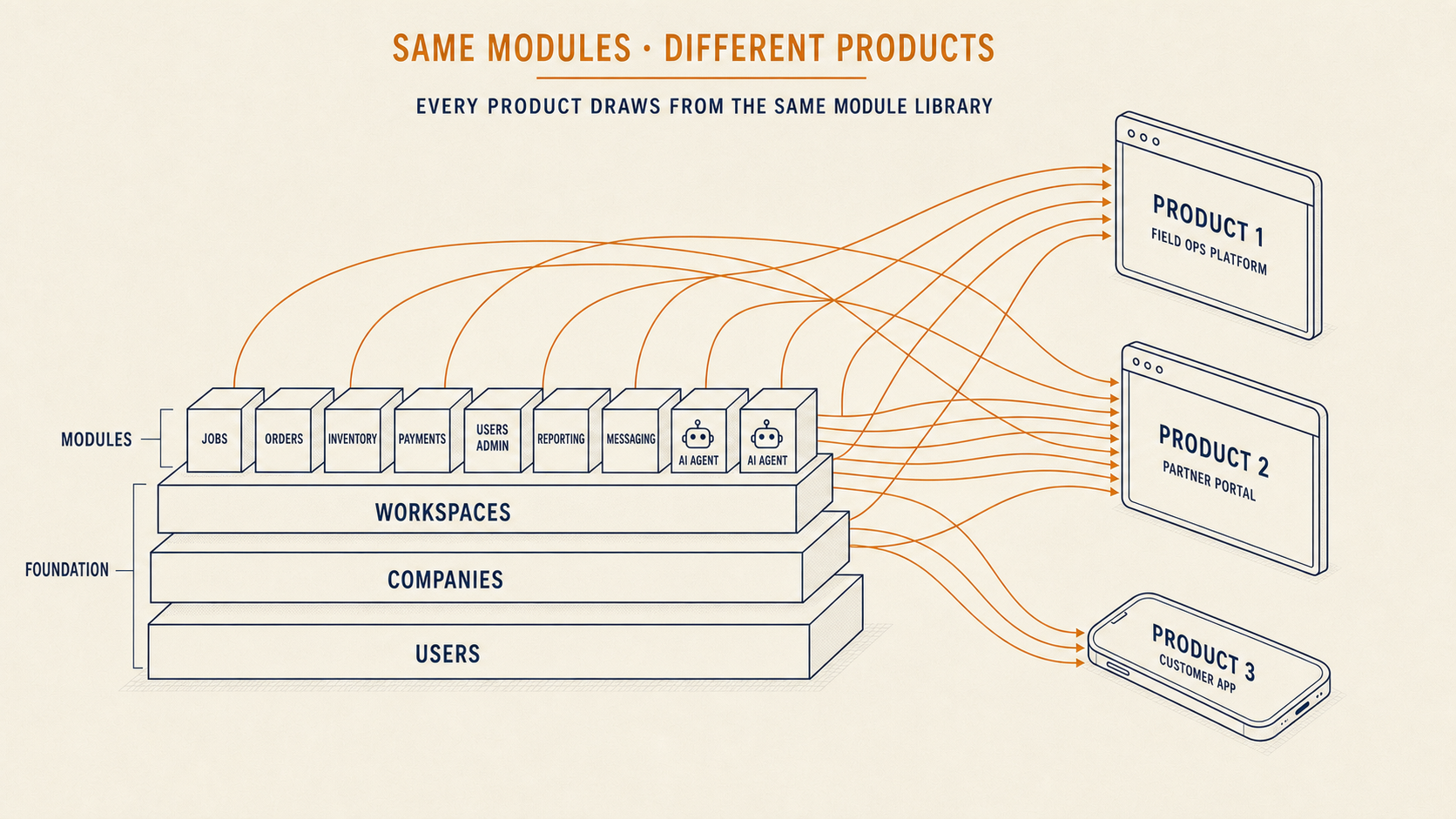
Most digital products are built as a single application. One codebase. One database. One user interface. That works well until the product needs to serve different types of users, different customer companies, or different features that need to evolve at different speeds.
A modular platform is a different starting point. Instead of a single application, it is a foundation made of four building blocks — Users, Companies, Workspaces, and Modules — that any digital product can be built on top of. The building blocks stay the same across every product. What you build on top of them is what makes your product unique.
This guide walks through how the same four building blocks power six different kinds of digital products, and how AI coding tools and AI agents fit into the model.
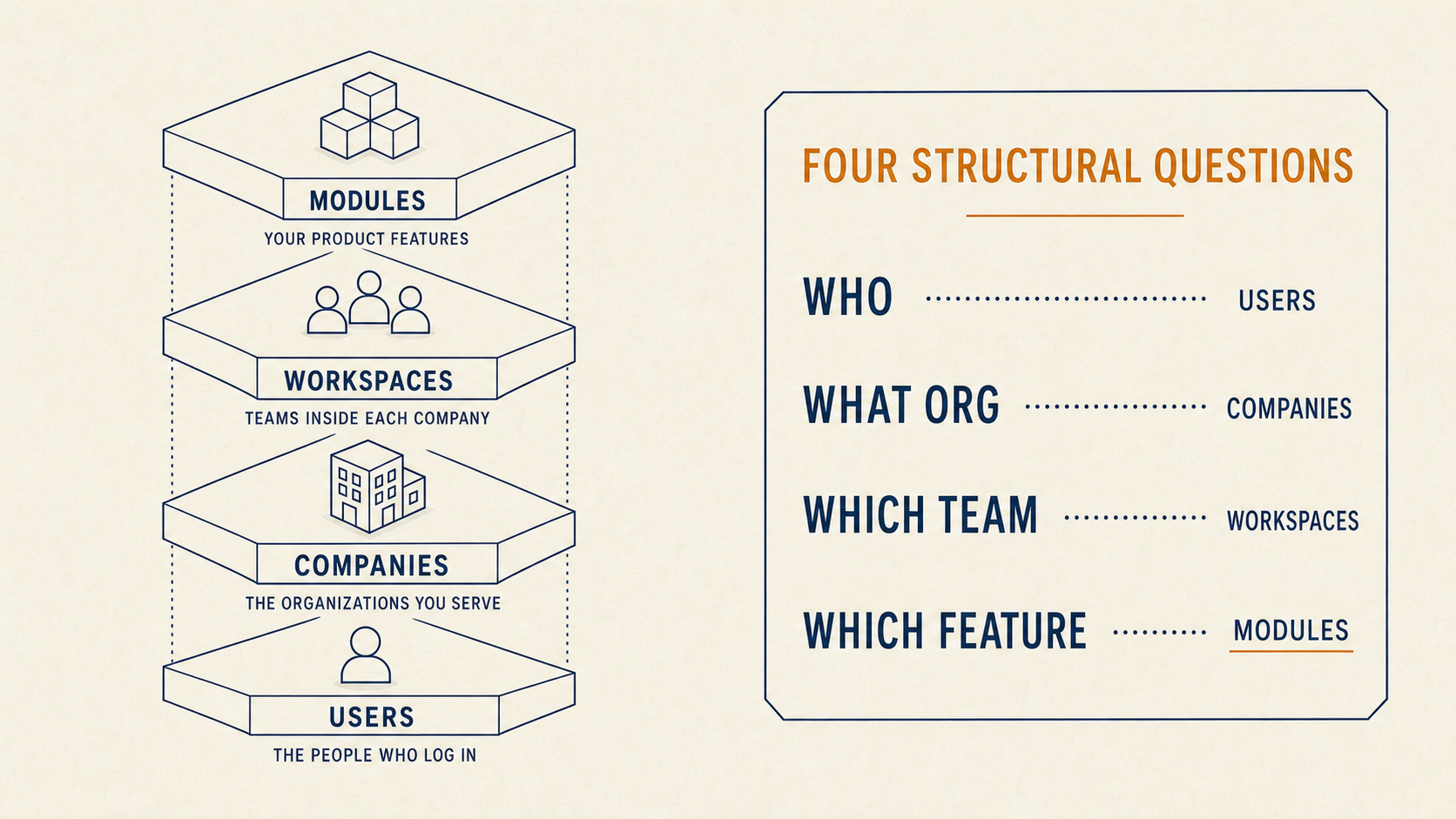
Every digital product has to answer four structural questions before writing a line of code. The four building blocks of a modular platform answer them explicitly.
The people who log into your product. One person can belong to many companies. A single account carries their identity across every context.
The organizations you serve. Your paying customers, the businesses whose data lives on your platform, or the tenants in a multi-tenant application. Every company has its own users, its own workspaces, and its own configuration.
The teams, regions, projects, or divisions inside each company. Workspaces are where work actually happens. A single company can have many workspaces, each with different members and different settings.
The features. Orders, Payments, Inventory, Chat, Listings, Jobs, AI Assistants. Each module is self-contained, plugs into the foundation, and can be added, removed, or replaced without touching the rest of the product.
Every module in the platform runs against the same four building blocks. Users have roles inside companies. Companies contain workspaces. Workspaces run modules. Permissions flow through all four layers automatically.
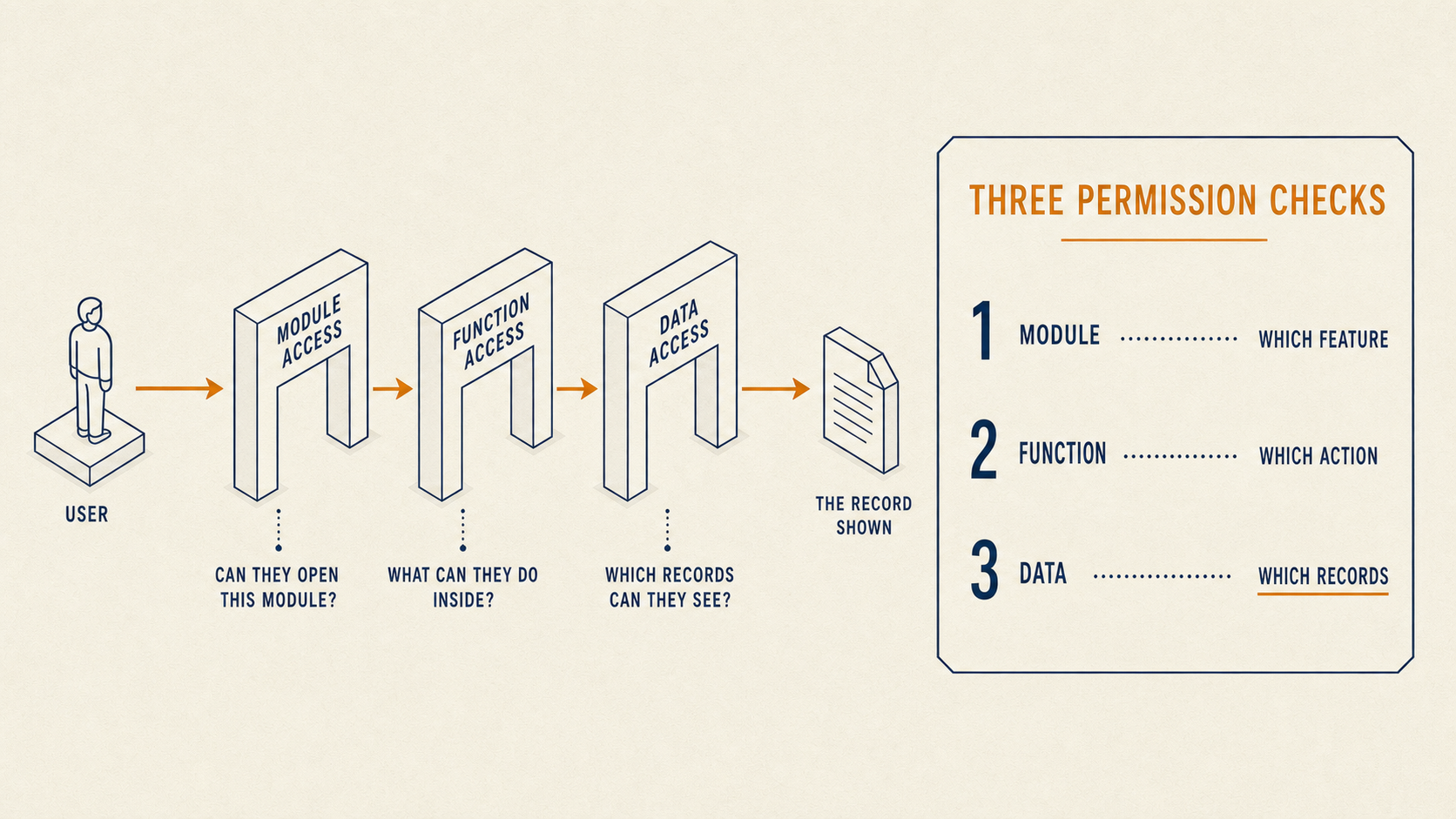
When someone opens your product, three questions are answered by the foundation before anything appears on screen.
The Orders module. The Billing module. The AI Assistant module. If a user's role in this company and this workspace does not grant them access to the module, they never see it.
View, edit, approve, delete, export. Every function inside every module is permissioned separately. A dispatcher can view every job in the workspace. A technician can only view and edit their own.
Their own team's data. Their whole company's data. Everything in a specific workspace. Every action returns only the records their role is allowed to see.
Every request in the platform passes through these three checks. The checks are built into the foundation, so you do not write them for each feature.
This is what lets you onboard an enterprise customer with 40 users across 5 subsidiaries as a configuration change, not a code change.
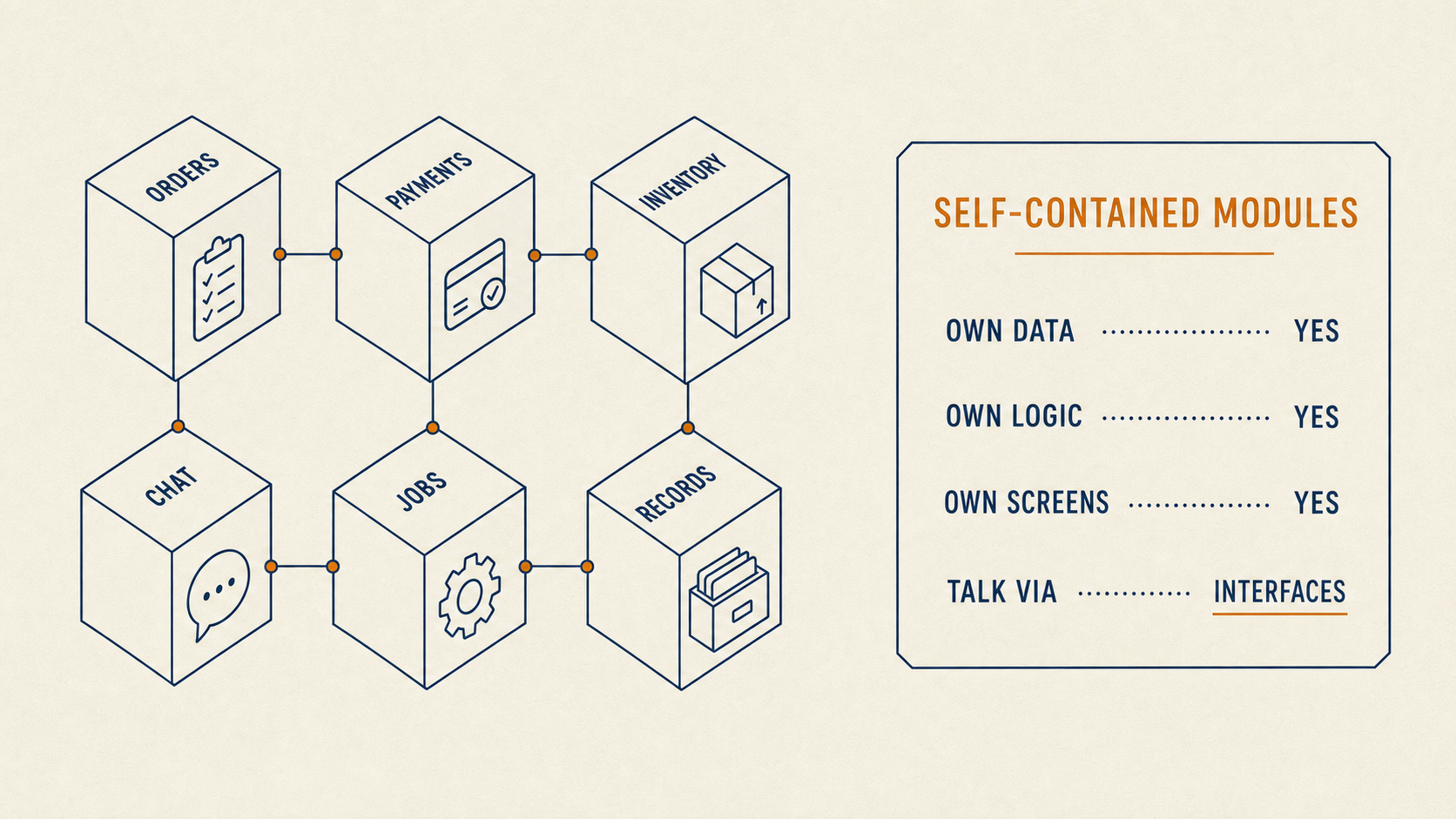
Each module in the platform — Orders, Payments, Inventory, Chat, Jobs, Records, or whatever your product needs — is its own self-contained unit. It has its own data, its own logic, and its own screens.
Modules talk to each other through defined interfaces. The Payments module does not reach into the Orders module's database. It asks a question through an interface and gets an answer back. The interface is the contract between them.
This matters because your product will grow. You will add features. You will remove features. You will rebuild features when you learn what your customers actually need. In a modular platform, that is an isolated change to one module. In a monolithic application, every change touches everything.
Independent modules also mean independent teams. You can hire a developer to build a Reporting module without giving them access to every other part of the platform. You can hand a module off to a partner or a contractor. You can replace a module wholesale without a re-platforming project.
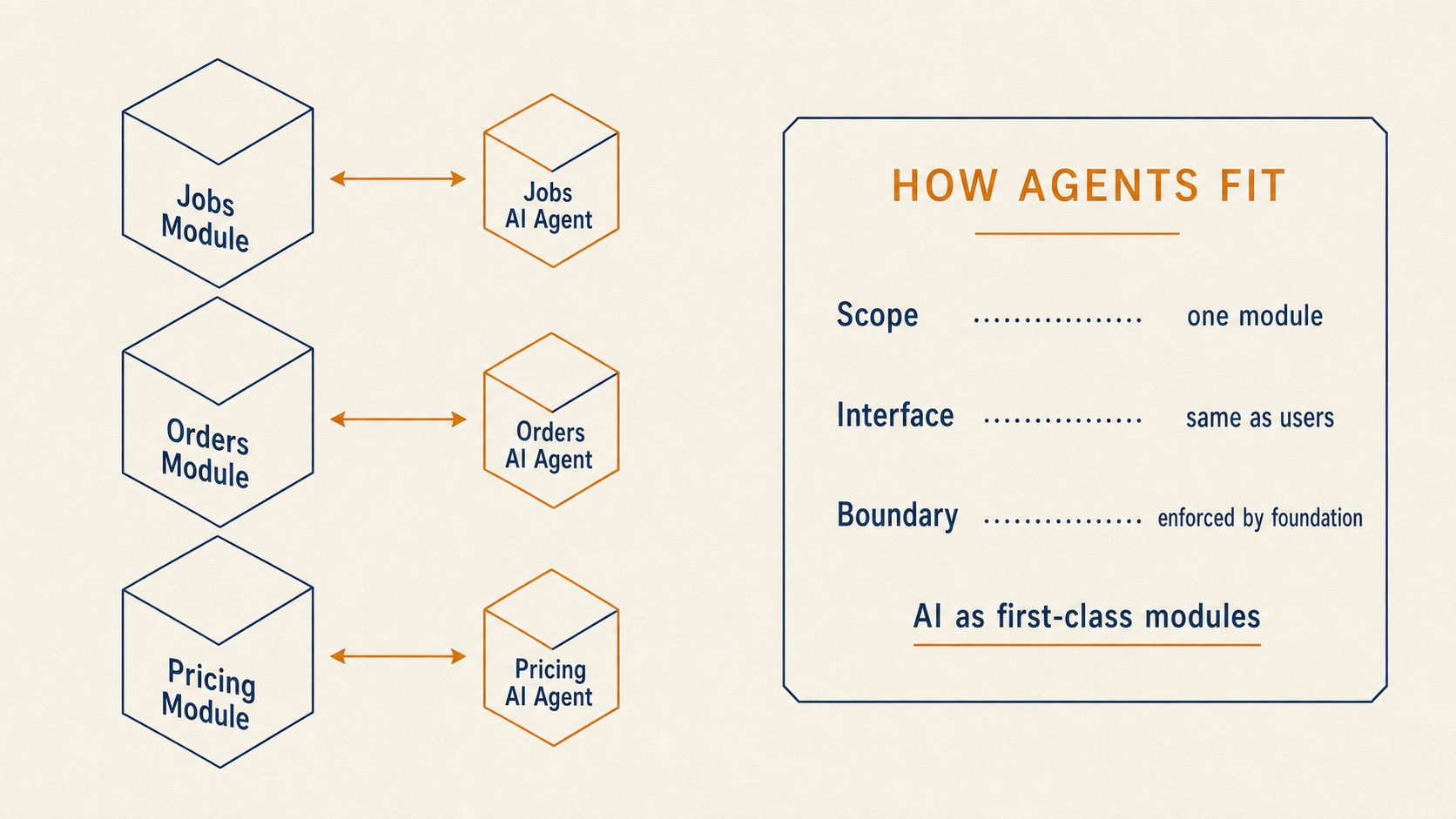
AI agents work best when they have a defined job and a defined scope. In a modular platform, every module gets its own AI agent — a separate first-class module that lives outside the host module and talks to it through the same interfaces users and other modules use. The Jobs module gets a Jobs AI Agent. The Orders module gets an Orders AI Agent. The Pricing module gets a Pricing AI Agent.
Each agent operates against a defined boundary.
The agent is a first-class module in its own right, not a bolt-on. This is how AI becomes a native part of your product rather than a feature stitched onto the outside. And it is how you build AI features that work at scale, whether you have one customer or ten thousand — because every agent inherits the same permission and boundary rules the rest of the platform runs on.
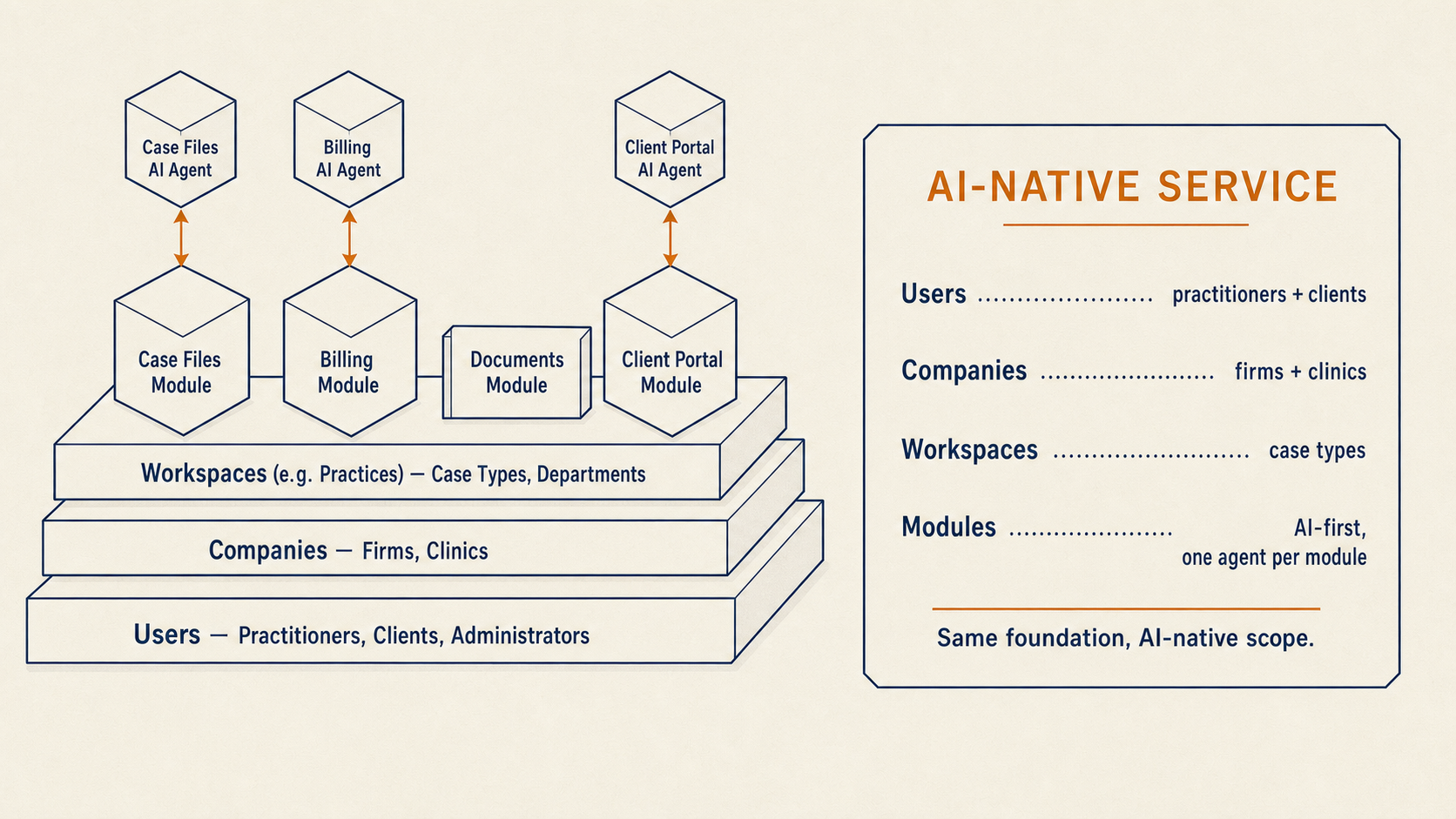
The same foundation powers very different digital products. Below, six product categories are mapped to the same four building blocks. Notice how the foundation stays the same across every product. What changes is what you build on top of it.
Users: Loan officers, borrowers, underwriters
Companies: Banks, lending firms, credit unions
Workspaces: Regions, loan products, or funding sources
Modules: Underwriting, KYC, Payments, Reporting, Compliance
Users: Technicians, dispatchers, customers
Companies: Contracting companies
Workspaces: Locations or crews
Modules: Jobs, Dispatch, Invoicing, Inventory, Customer records
Users: Shippers, carriers, coordinators
Companies: Broker firms
Workspaces: Lanes or regions
Modules: Listings, Matching, Payments, Reviews, Messaging
Users: Practitioners, clients, administrators
Companies: Firms or clinics
Workspaces: Case types or departments
Modules: AI Agents, Case Files, Billing, Documents, Client portal
Users: Providers, patients, administrators
Companies: Clinics or hospitals
Workspaces: Departments or specialties
Modules: Records, Messaging, Scheduling, Claims, AI intake
Users: Owners, tenants, staff
Companies: Property management companies
Workspaces: Buildings or portfolios
Modules: Leases, Maintenance, Payments, Reporting, Tenant portal
Six very different products. One foundation. The four building blocks do not change — Users, Companies, Workspaces, Modules — but what you place on top of them defines your product.
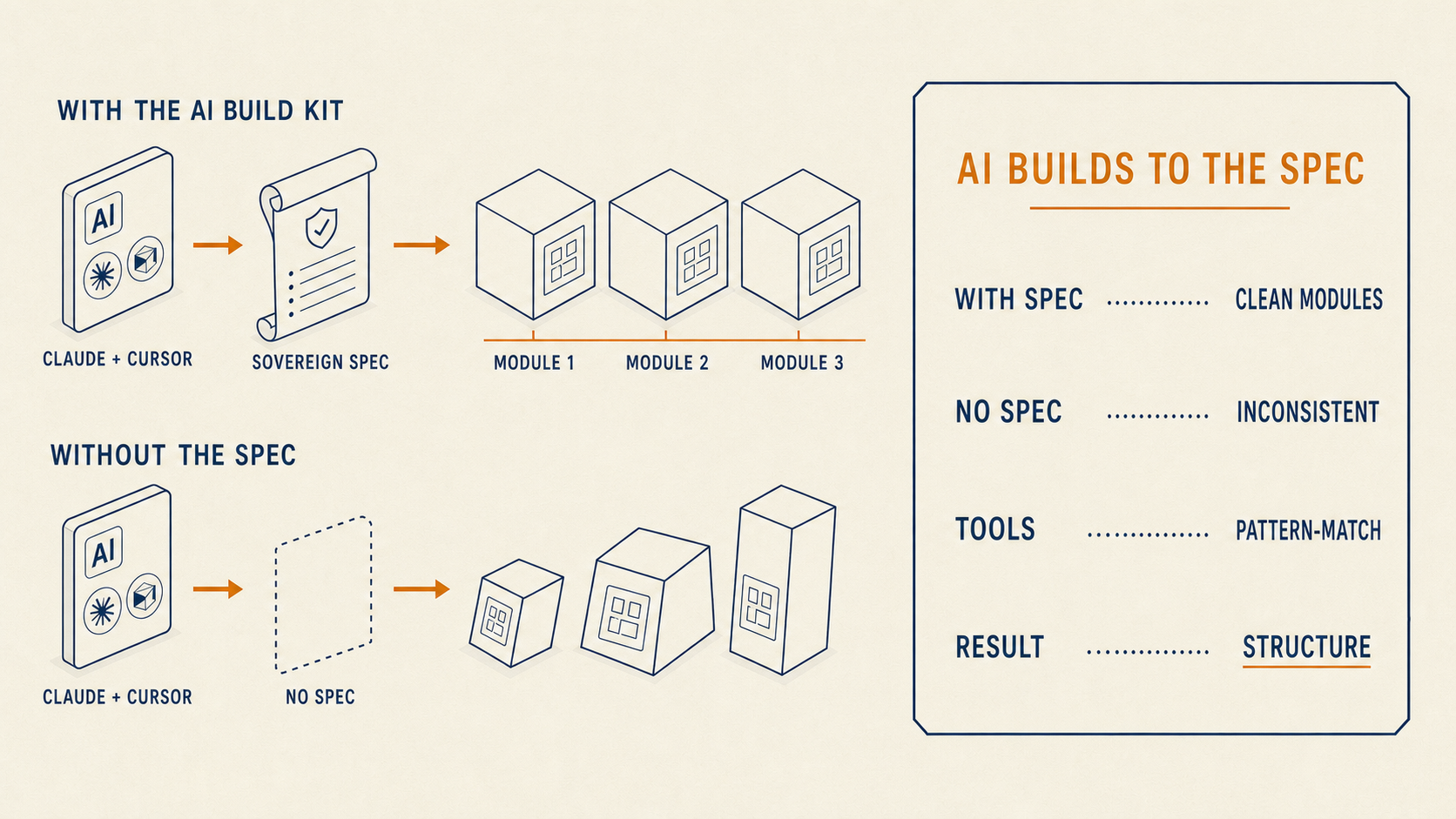
AI coding tools like Claude and Cursor are exceptional at generating code against a clear pattern. They are pattern-matchers. They replicate the structure and style of the code they can already see, and they extend it into new files, new features, and new modules.
This makes them extraordinarily powerful when they are pointed at a well-structured foundation. Every new module the AI builds follows the same interfaces. Every new feature respects the same permission model. Every AI agent honors the same scope rules. The AI stops guessing and starts composing.
Without that structure, the same tools do exactly what they are trained to do — pattern-match against whatever is already there. If the codebase has loose boundaries, the AI will faithfully replicate loose boundaries in every new file. Speed goes up. Structure does not.
The AI Build Kit is a set of specifications, prompts, and patterns that describe the sovereign foundation to Claude and Cursor. Give them the Kit, and they build modules that plug cleanly into the platform. Without it, they build code that works — but does not share a consistent structure across your product.
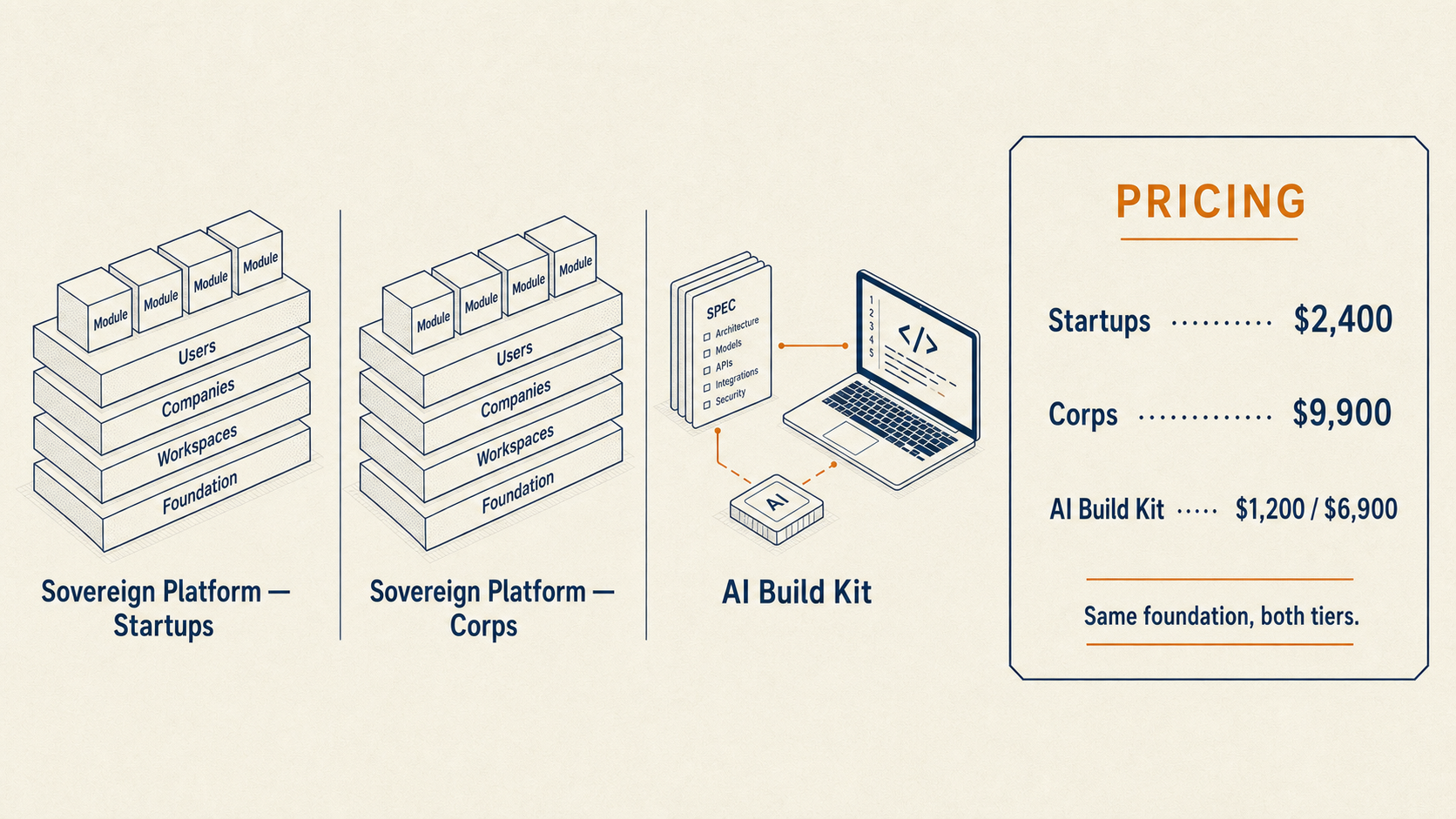
Freshify sells the sovereign foundation as a starting point for your digital product. Same-day GitHub delivery. You own the code.
For startups and pre-Series-A teams. The full four-layer foundation with the Users, Companies, Workspaces, and Modules building blocks, sample modules, and setup documentation. Strictly do-it-yourself — you and your dev partner build modules on top.
For corp teams. Everything in the Startups tier, plus onboarding, module templates, deployment guidance, and access to the module registry.
The specification, prompt library, and patterns that make Claude and Cursor build modules against the sovereign foundation. Bundles with the Platform at a discount.
Every product ships with a video walkthrough, a companion document, and a three-step post-purchase guide so you know exactly how to use what you bought.
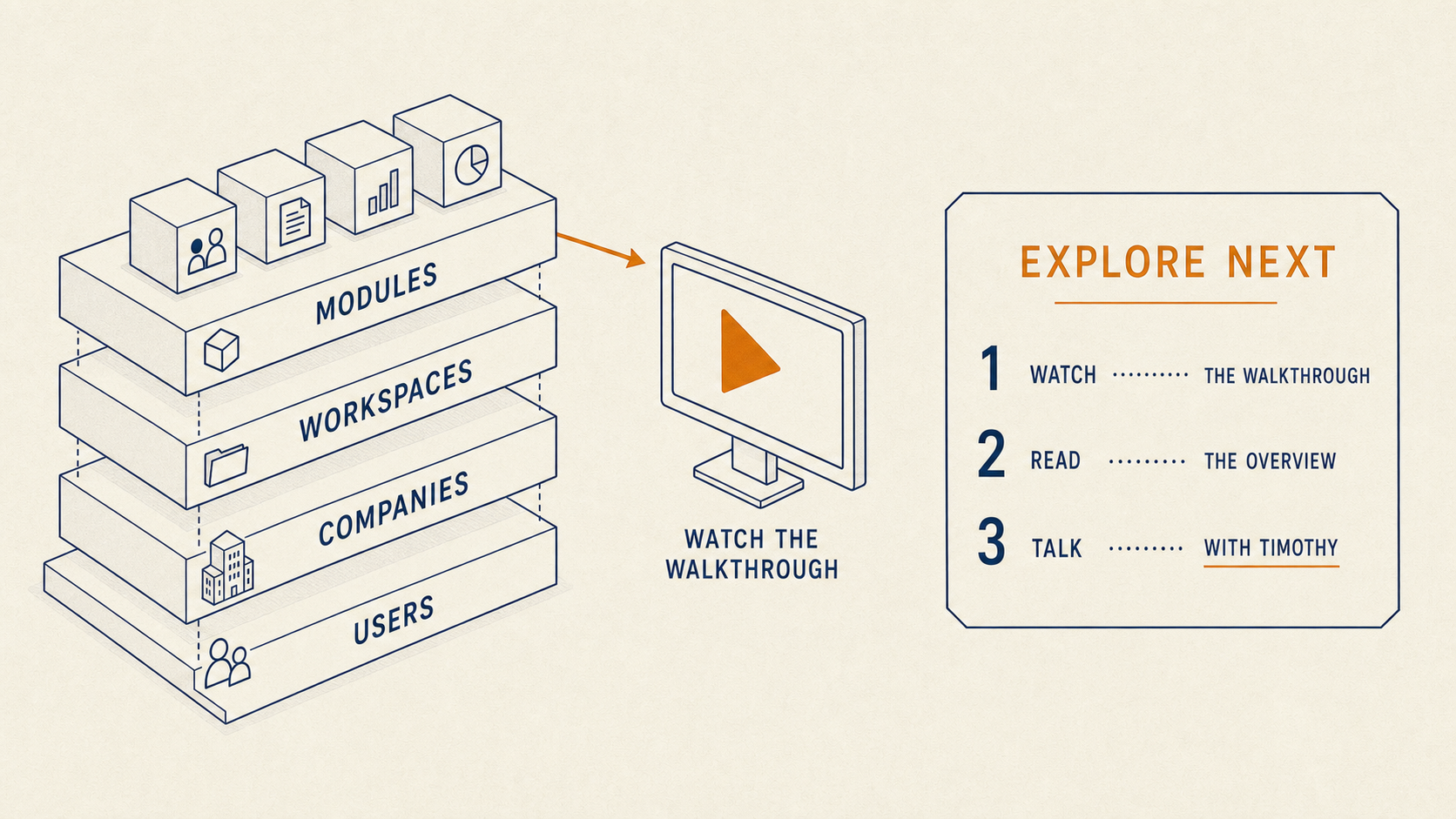
Three next steps depending on where you are.
A short video walkthrough of the foundation, the four building blocks, and how they compose into a real digital product.
Already running software today? The conversion estimate maps your existing stack to the sovereign foundation — modules, sequence, timeline, pricing. One reply, no obligation.
Thirty minutes to walk through your product idea and how the foundation maps to it. Bring wireframes, a business plan, or just a rough sketch. Book a walkthrough →
— Timothy Baio, Senior Innovation Consultant, Freshify.